


Prolonged subscriber inactivity
Subscribers are expected to pay for and use services — this is normal behavior. If they do not use the service (even with timely payments), this indicates potential problems. Statistics make it possible to identify active and inactive subscribers.
Unfortunately, statistics cannot identify completely inactive subscribers who have no connection to the router (for example, the patch cord is unplugged, the router is powered off, etc.). To identify this group, it is necessary to compare statistics with data exported from the billing system.
It is recommended to segment subscribers into three activity groups:
- Normal.
- Low (technical).
- Absent.
Activity can be measured by:
- Number of sessions.
- Number of hosts.
It is best to determine the norm after building a distribution based on exported data, but usually these metrics are measured in dozens per day, at least 3–4 times per week.
The filter can be configured in the GUI in the section QoE Analytics → Subscribers → Clickstream.
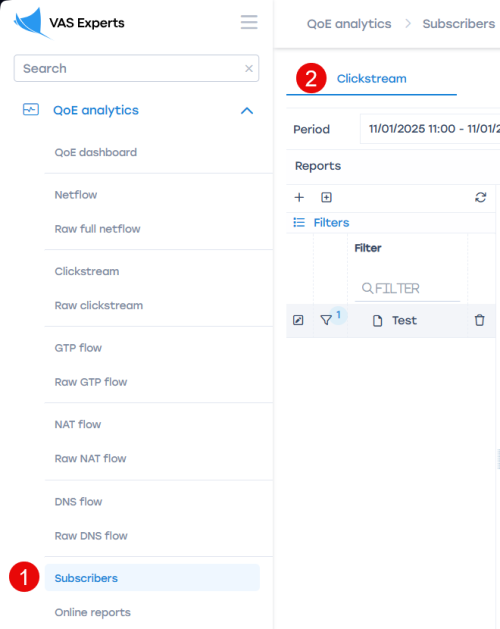
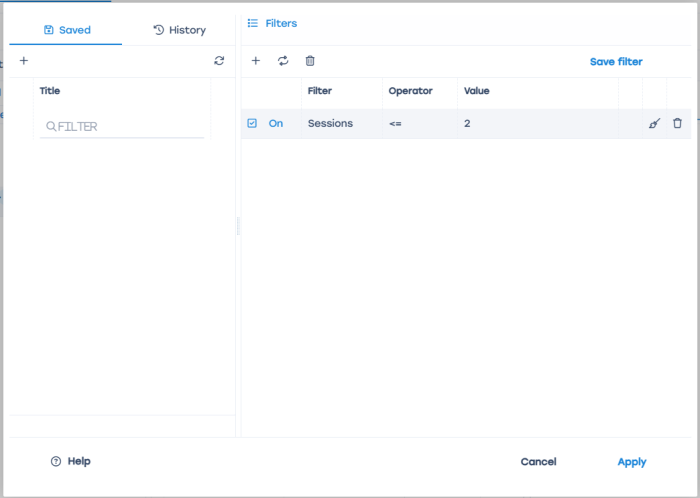
If subscribers move from the normal activity segment to low-activity segments and remain there for more than three weeks, this may indicate problems.
Database query method:
Will be added later
Was this information helpful?