


Sharding configuration and QoE cluster setup
QoE Stor can operate in sharding mode — horizontal cluster scaling, where parts of a single database are distributed across different shards (nodes).
Sharding allows you to:
- Distribute the IPFIX insertion load from multiple DPI units by spreading it across nodes.
- Significantly accelerate report generation by leveraging the combined computational power of all nodes — reports are built in parallel and merged into a final result.
1. Cluster creation
To create a QoE Stor cluster, configure the cluster node settings on each node in the file /etc/clickhouse-server/config.d/qoestor-cluster-config.xml.
Edit the file on the first node:
<?xml version="1.0"?>
<yandex>
    <remote_servers>
        <qoestor_cluster>
            <shard>
                <replica>
                    <host>127.0.0.1</host>
                    <port>9000</port>
                </replica>
            </shard>
            <shard>
                <replica>
                    <host>127.0.0.2</host>
                    <port>9000</port>
                </replica>
            </shard>
            <shard>
                <replica>
                    <host>127.0.0.3</host>
                    <port>9000</port>
                </replica>
            </shard>
        </qoestor_cluster>
    </remote_servers>
</yandex>
Specify the IP address or hostname for each shard. Save the changes.
Copy the file to the remaining cluster nodes.
Restart the database with the fastor-db-restart command on each node. The cluster is now ready for operation.
2. Adding the cluster in GUI
1. Master node connection
Select which node will act as the master. Connect it in the GUI settings and enable cluster mode. See the screenshot below.

2. Management via SSH
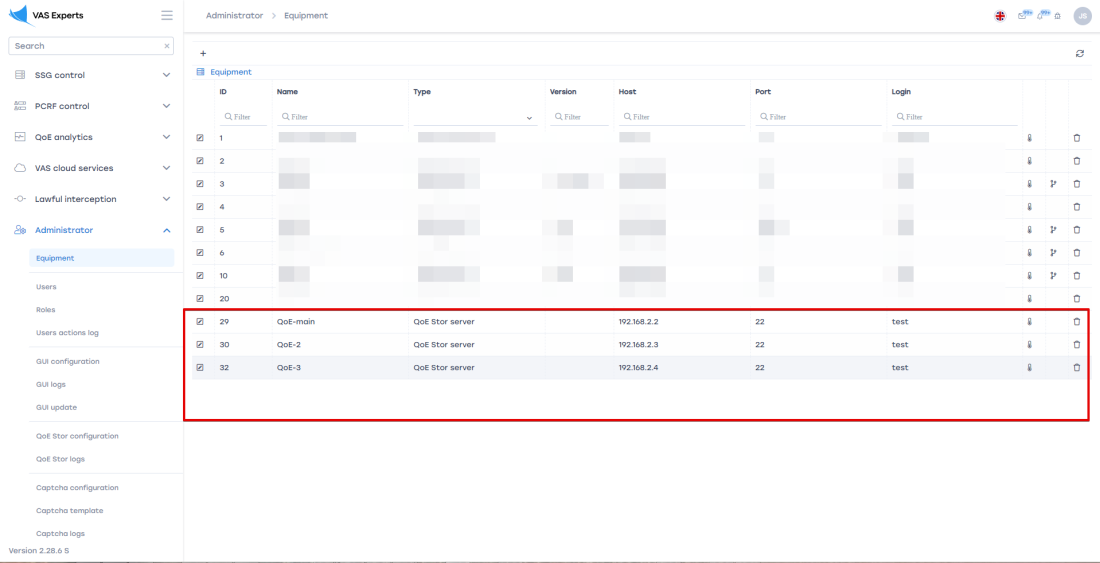
In the GUI section Administrator / Equipment, add all nodes for SSH management.
3. IPFIX receiver configuration
In the QoE Stor configuration, set up receivers for each node.
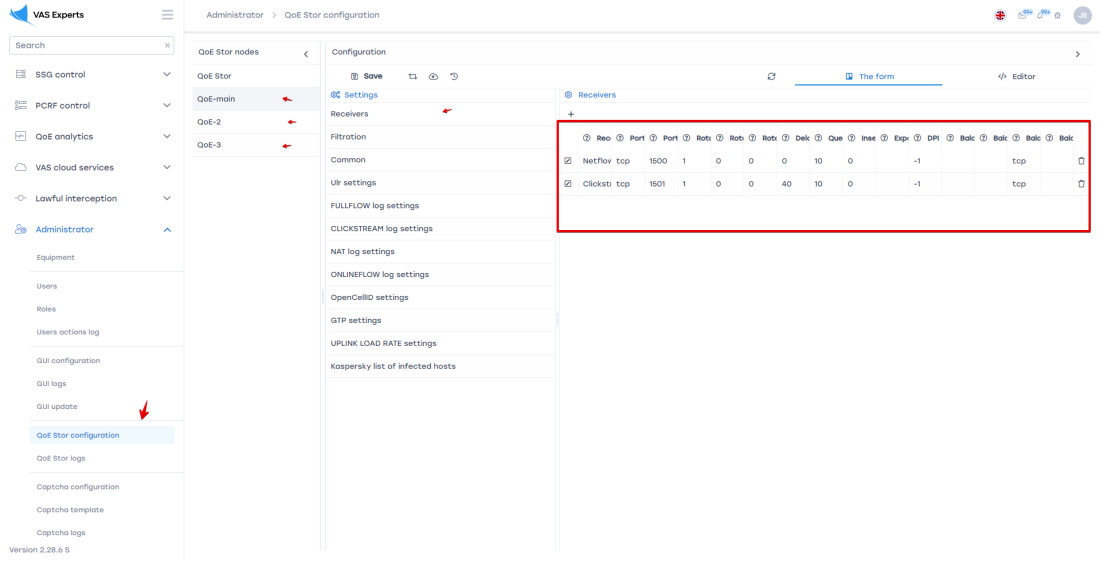
Reconfigure the DPI to send IPFIX to the corresponding QoE cluster nodes.
Was this information helpful?